My phone can reach the dev server without my laptop
 Tõnis4 min read
Introduction
I moved ClawTab's mobile development server to k3s. The development app on my phone can load its JavaScript from that server. My laptop no longer has to be the machine serving it.
I like this feature because it removes a dependency from working away from the computer. I can already follow coding agents through ClawTab. Having the mobile app's development server available separately makes it easier to check what they're changing.
The useful part is the split between two things: installing a native app on the phone and delivering JavaScript to that app. Moving the second part to a server leaves the first part with its own build requirements.
The installed app and the JavaScript have different lifetimes
ClawTab's mobile app uses an Expo development build. That puts the native app and its native dependencies on the phone. Metro, React Native's JavaScript bundler, serves the JavaScript the development app runs.
I can keep that development build installed while changing screens, styles and other JavaScript or TypeScript code. Expo's development build documentation describes the same boundary: JavaScript changes don't require rebuilding the native app, while native libraries and native configuration changes do.
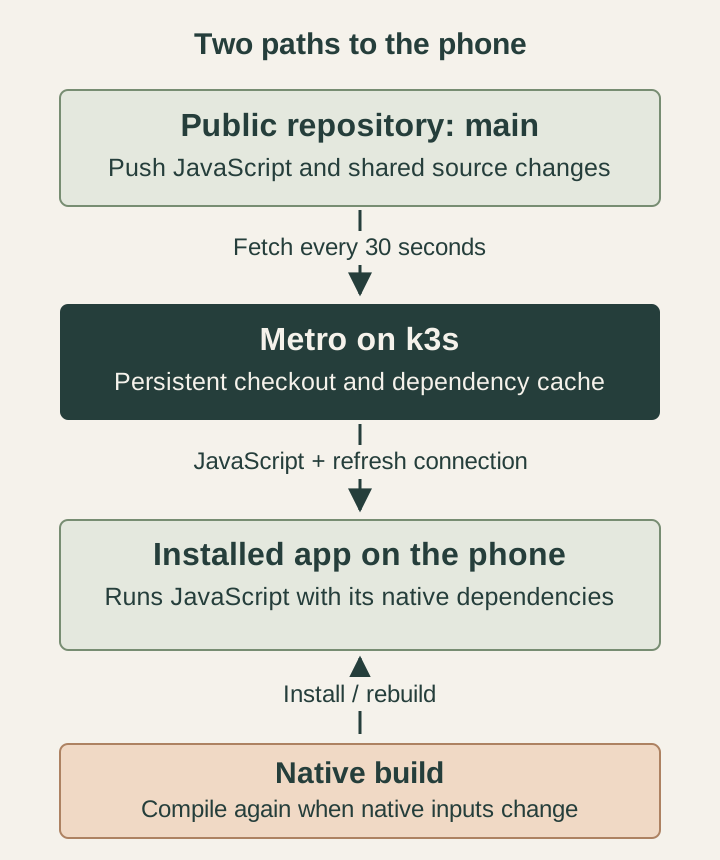
The diagram shows the two delivery paths. A native build installs the app; the shared server supplies its JavaScript while I'm developing.
Give the phone a server that stays available
In my earlier networking setup, a Cloudflare Tunnel made a local Metro server reachable from outside the local network. That solved reachability. The computer running Metro still had to stay available.
The shared setup runs Metro in my k3s cluster, with HTTPS and WebSockets routed through Traefik. The development app connects to that endpoint. The server keeps its own checkout and dependency cache on a persistent volume.
I use one Metro replica and one bundler worker. The container has a limit of one CPU and 5 GiB of memory. Those are resource limits for this setup, rather than a recommendation for every React Native project.
This is still a development server. It serves the code I'm checking during development; app store releases use their own build and release process.
A push to the public mobile repository updates the checkout
The server follows main in the public ClawTab repository. It checks for changes every 30 seconds and updates its checkout when the branch moves. That interval is the polling configuration, not a promise that an edit reaches the phone in 30 seconds.
For ordinary source changes, Metro keeps running and watches the updated files. With a connected app, Fast Refresh can update React components. Some changes cause a full reload or reset component state; React Native's Fast Refresh documentation explains those limits.
The distinction matters when an agent works in a separate branch. An unpushed change in its worktree doesn't appear on the phone through this shared server. It has to reach the public repository's main first. The phone is checking the shared branch, rather than whichever checkout I most recently edited.
The table shows which path each kind of change takes.
| Change | What happens in this setup |
|---|---|
| Screen, style or other JavaScript source | The server picks up the pushed revision; Metro watches the changed files. |
| Lockfile, package manifests, Metro/Babel or Expo configuration | The update script installs dependencies and restarts its Metro process. Native configuration may also require a phone rebuild. |
| Native dependency or native app configuration | I need a new compatible development build installed on the phone. |
| Git fetch fails | The server keeps the current checkout and retries on the next interval. |
Moving Metro doesn't remove the need to understand a change. The native app can become incompatible with the JavaScript it's asked to load. A reachable server can't fix that.
One shared branch is useful, with a clear limit
I chose a single shared checkout for this setup. Everyone connecting to its endpoint gets the same branch. That's simple to reason about, but it doesn't provide a separate preview for each agent's worktree.
A branch-specific preview would need its own checkout and a way to select the matching server. Until then, local Metro remains useful when I want to inspect an isolated change before merging it.
The shared server removes one specific requirement: my laptop doesn't have to serve JavaScript for the development app on my phone. The server still has to be reachable, the change has to be on the branch it serves, and the installed native build has to be compatible. Those are boundaries I can work with.