How I connect agents, databases, and local builds from anywhere
 Tõnis5 min read
Introduction
When I follow coding agents from my phone, several connections make that possible. ClawTab carries the conversation with the agent. A development app needs its own route back to the machine serving its JavaScript. A database client needs access to PostgreSQL. Server maintenance needs a shell.
I use ClawTab's relay, SSH, Tailscale, and Cloudflare Tunnel. Each connection serves a different purpose: agent interaction, server administration, database access, or loading a development app.
This is the networking companion to how I maintain projects with coding agents. The question here is practical: when I'm away from the computer, which connection lets me do what?
Start with the thing I need to reach
I choose the connection based on what I need to reach.
| What I need | Connection path | What becomes available |
|---|---|---|
| Follow or control an agent | Phone → ClawTab relay → machine running ClawTab | Agent sessions, output, and job commands |
| Administer the server | Computer → SSH → k3s host | A server shell and configured local forwarding |
| Connect to PostgreSQL | Authorized tailnet client → Tailscale service proxy → PostgreSQL service | Selected database endpoints |
| Load a local development app remotely | Phone → development hostname → Cloudflare Tunnel → local Metro server | The development server's HTTP traffic |
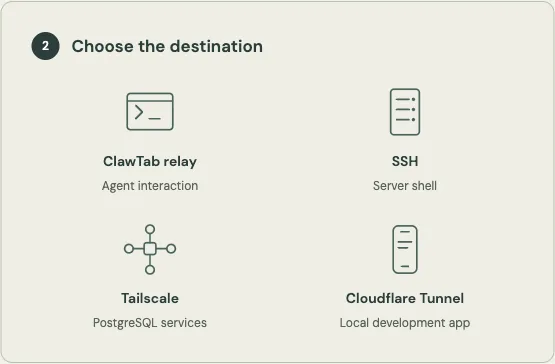
The table describes application paths, not every packet hop. It also explains why seeing an agent's terminal doesn't prove that a mobile build or a database is reachable. Those requests have different destinations and dependencies.
ClawTab's relay keeps the agent within reach
ClawTab gives me a remote interface to work running on another machine. Its relay connects that interface to the machine side of ClawTab. The mobile transport includes commands to run, stop, pause, and resume jobs, alongside requests for their output and history.
That is the connection I use when I read an agent's progress or respond from my phone. The agent and its tools still run on the machine. The phone gives me another place to interact with them.
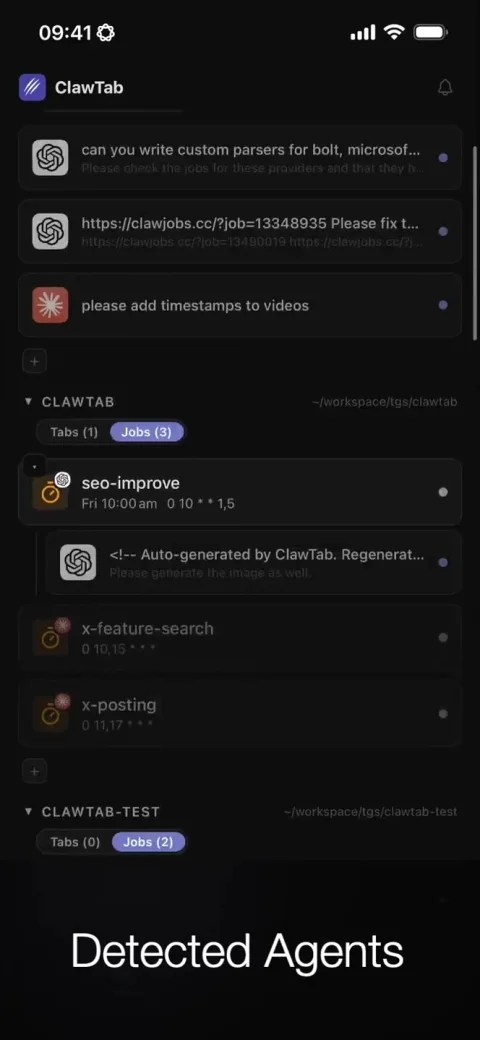
The screenshot shows the part I interact with. Underneath it, ClawTab has a relay service and a daemon that owns the machine's running work. Its daemon and tmux architecture explains why closing the desktop window need not stop the work.
This matters when I switch devices. I can keep following a session without first opening an SSH terminal on the phone. It still depends on the machine and the relay connection being available; a remote interface cannot keep a powered-off computer executing commands.
SSH remains the server access path
For server administration, I connect to the k3s host over SSH. That gives me a shell on the server, with local forwarding available when I need to reach a service through it.
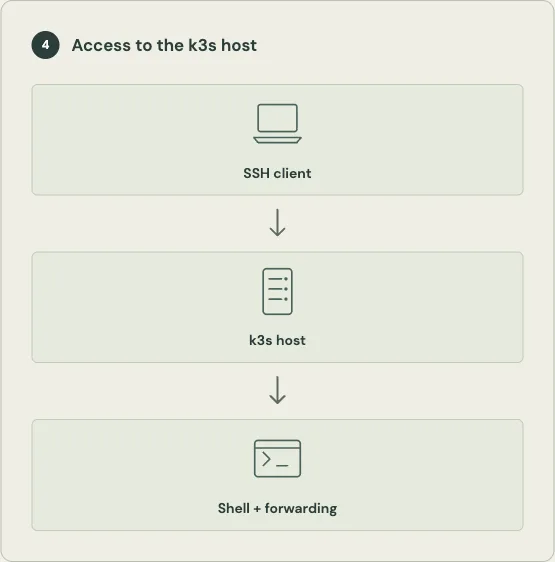
A shell is useful when the question concerns the host: a process, disk space, or a service that needs investigation. Local forwarding can also carry a connection through SSH to a destination reachable from the server. The exact destinations and bindings depend on the SSH configuration.
SSH gives me access to the host itself. Managing Kubernetes resources uses the Kubernetes API and its credentials.
Tailscale exposes the database services I need
I use the Tailscale Kubernetes operator to make selected PostgreSQL services available on my private Tailscale network, or tailnet. It connects clients to the read/write services managed by CloudNativePG. This gives me database access without exposing the Kubernetes API or routing the whole cluster network.
A permitted client can reach the selected database endpoint through the tailnet. PostgreSQL still handles database authentication and permissions. Network access is one prerequisite for a query, not the whole authorization decision.
| Layer | What it answers |
|---|---|
| Tailnet policy | May this client reach the exposed service? |
| Kubernetes service | Which database workload receives the connection? |
| PostgreSQL authentication and permissions | May this database role connect and perform the requested operation? |
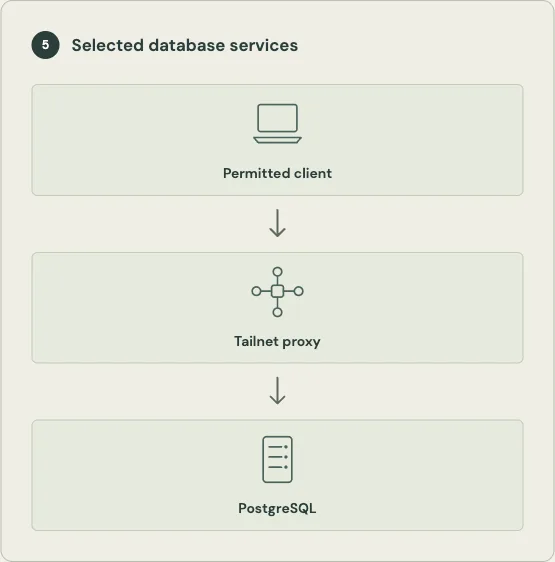
The operator supports exposing individual Kubernetes services to a tailnet, so I can make the database endpoints available without opening access to every service in the cluster.
Cloudflare Tunnel gives a local build a reachable name
The other half of remote mobile development is opening the app I'm changing. I use cloudflared and Cloudflare tunnels to give local services DNS names I can reach remotely. Metro, the JavaScript development server used by the mobile projects, is one example.
For ClawTab and Trend Seeker, I start Expo with a configured Metro port and set EXPO_PACKAGER_PROXY_URL to the development URL. This makes Expo advertise an address my phone can reach while I'm away from the local network.
Cloudflare documents the general mechanism: cloudflared establishes outbound connections to Cloudflare, and a published application route maps a hostname to a local service. The phone requests the hostname; the tunnel carries that traffic back to the development machine.
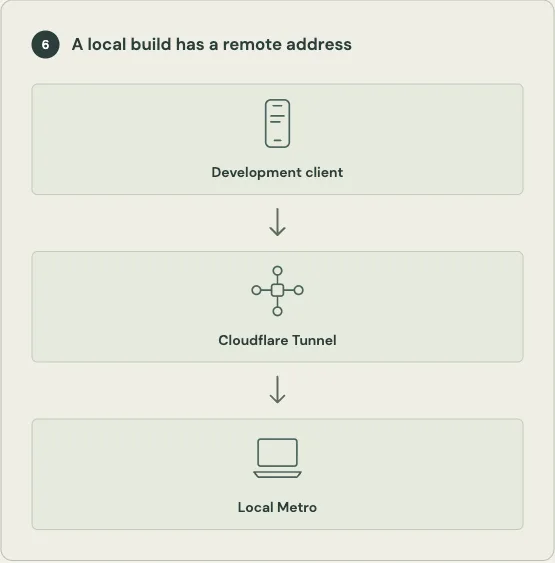
There are two practical limits. The machine and development server must stay available. Also, a reachable hostname does not by itself establish who may use it. Authentication and access policies determine who can use the service.
Remote mobile work uses two paths together
For example, when an agent is changing a mobile screen, the feedback cycle can look like this:
- I read the agent's output and send a correction through ClawTab's relay.
- The agent changes files on the development machine.
- The mobile development client reaches that machine's Metro server through the development hostname and Cloudflare Tunnel.
- I inspect the app and send further feedback through ClawTab.
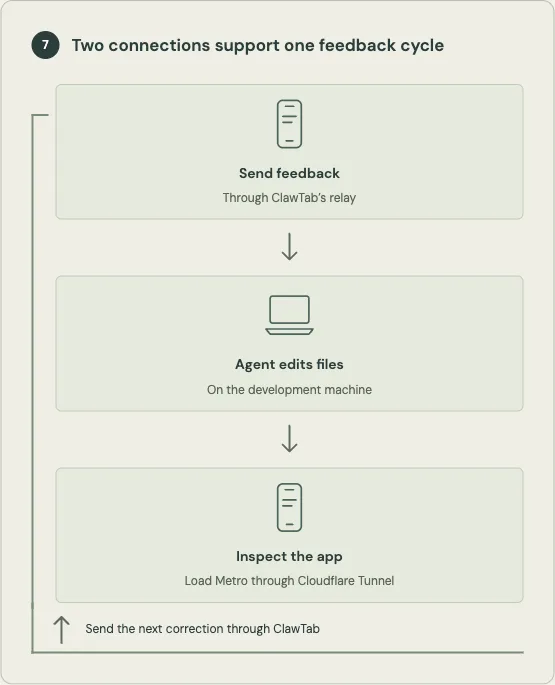
The conversation and the app preview travel through different systems. This is also where the separation helps with debugging. If ClawTab works but the app cannot load its development bundle, I would check the Metro process, advertised URL, and tunnel route. If the app loads but agent commands fail, I would investigate the ClawTab connection. A failed database query calls for checking the database path and credentials instead.
I still return to the computer for bigger debugging sessions, releases, and checking data fidelity. Remote access lets me continue useful parts of the work while away; it doesn't make every task equally comfortable on a phone.
The networking choice starts with the resource I want to reach. ClawTab carries agent interaction, SSH provides server access, Tailscale exposes selected databases, and Cloudflare Tunnel brings local development services to a remote device. Together, those paths explain how the work stays accessible across my machines and phone.