When a build stops, its child processes should stop too
 Tõnis5 min read
Introduction
My computer was slow, and I was trying to figure out why. I run coding agents in separate worktrees, but their builds share one computer. A Rust build in one terminal and an Android build in another still compete for the same CPU, memory and disk.
I've put local build commands behind a small Python wrapper that owns their process group and cleans up when the work ends. For builds that depend on external storage, it also watches the mount and stops the build when that dependency disappears. Alongside that, I keep a four-worker default to reduce the load from several agents building at once.
These address different problems. Limiting workers controls how much work a build starts. Cleanup controls how long its processes are allowed to remain.
Diagnose the build that is still running
The earlier build targets called Cargo or the desktop builder directly. They had no common stop policy for a missing external volume or a calling process that exited. The main build command's exit also wasn't a cleanup step for everything it had started.
A compiler left running after its build command exits can be hard to distinguish from useful work in another terminal. Retrying the build adds another set of processes before that question is answered.
Separate the cases before choosing a fix:
| Symptom | Response |
|---|---|
| Children remain active after the build command exits | Clean up the whole process group |
| A required volume disappears while the build runs | Monitor the mount and enforce a deadline |
| Several valid builds compete for resources | Limit workers and simultaneous builds |
On macOS, inspect process IDs, parent IDs and process groups alongside CPU use. The relationship between processes helps explain which build they belong to. For general sluggishness, also check memory pressure and swap in Activity Monitor. Apple explains what those memory readings mean; a CPU percentage alone won't explain memory pressure.
Give each build its own process group
The wrapper starts the command with Python's subprocess.Popen(..., start_new_session=True). On POSIX systems, Python calls setsid() before executing it, giving the build a new session and process group. Ordinary children inherit that group. The Python subprocess documentation describes the option.
The wrapper stays outside that group. It can send a signal to the group even after the original build process has exited, while keeping itself alive to finish cleanup.
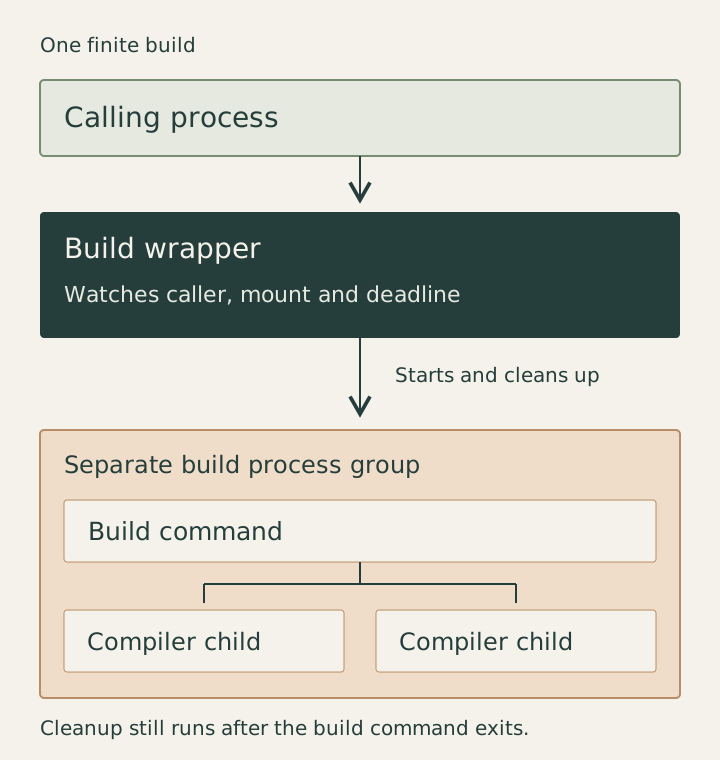
Cleanup runs after success as well as failure. A zero exit code says the main command succeeded; it says nothing about a child process that the command left behind.
The wrapper first sends SIGTERM to the group and gives it five seconds to stop. It then sends SIGKILL to anything remaining in that group. The build's exit status is preserved, so callers still receive the result of the command they asked to run.
This policy is for finite builds. A development server that should keep running needs a different owner and lifetime.
Stop when the caller or storage goes away
The wrapper records its parent process and the required volume's mount entry before starting. It refuses to start if that volume is missing. While the build runs, it checks the mount every two seconds and watches for the calling process to exit.
It also handles cancellation signals and has a default deadline of 45 minutes. A known longer build can override the deadline. Timeout returns exit code 124; a lost volume or caller returns 125. Those results make the reason for stopping visible to the script or agent waiting for the build.
The mount check reads the macOS mount table instead of probing a file on the external disk. The monitor itself lives on the internal drive, so it can keep running when the external volume disappears.
A mounted disk can still have stalled I/O. Mount presence isn't a disk-health test. The deadline provides a separate stop condition, and terminating a process still depends on the operating system being able to act on its signals. Keeping SDKs and compiler executables on the internal disk removes their dependence on a disconnected external drive.
The caller check has a specific scope too: it watches the wrapper's parent process. If an agent disappears while its shell stays alive, that shell still counts as a live caller.
Use four workers when several agents build
My default recommendation is -j4 where the build tool supports it. I want room to keep using the computer while agents compile things. I'm willing to trade some throughput from an individual build for that.
For Cargo, the direct command is:
cargo build -j4
Build scripts can use CARGO_BUILD_JOBS=4 when passing the setting through the environment is more convenient. Cargo otherwise defaults to the number of logical CPUs. Its documentation covers the jobs flag and environment setting.
For Android builds, I use Gradle's equivalent:
./gradlew :app:bundleRelease \
  --max-workers=4 \
  --no-daemon
--max-workers=4 limits Gradle's workers; see its performance options. --no-daemon avoids reusing a persistent Gradle daemon for this build. Gradle can still start a disposable JVM when the required JVM arguments differ from the client's, as its daemon documentation explains.
Four workers is a limit for each build, not a shared budget for all agents. Three builds can each schedule four jobs, and an individual compiler or linker can use more threads. If the computer is still struggling, reduce the number of builds running together. Lower worker counts and process cleanup complement each other; neither schedules the whole machine.
Check the failure paths with disposable processes
The wrapper's nine tests passed when rerun for this article. They cover exit codes, refusing a missing volume, and cleanup after both successful and failed commands. They also exercise timeout, cancellation, caller exit, and simulated volume loss or replacement.
The tests start disposable child processes, including one that ignores SIGTERM, so they exercise the escalation to SIGKILL. Mount changes are simulated. They don't unplug a physical disk or reproduce a kernel I/O hang.
The wrapper has also been used for a completed Android release build with four workers, giving it a normal build case alongside the failure tests.
A child that deliberately starts a new session can escape the group, and the wrapper cannot clean up if it is itself killed with SIGKILL. Shared compiler services also need their own lifetime policy. For the commands routed through this wrapper, the stop conditions and cleanup now live in one place instead of depending on whichever terminal or agent started the build.